Troubleshooting
"Permission to contact the server was declined"
The extension asks your browser for permission to reach your list's server the first time you connect. If you dismissed or declined that prompt, syncing won't work.
Fix: re-paste your invite link (or open it again) and approve the browser prompt this time. You only need to approve each server once.
Items aren't syncing / the list looks empty
Work through these in order:
- Re-approve the permission (see above) — this is the most common cause.
- Reload the extension — toggle it off and on from your browser's Extensions page, then reopen the popup.
- Check your internet connection. The extension talks to a shared server over the internet; if you're offline, nothing syncs.
- Check the server is up. Opening
https://api.sharedshoppinglist.xyz/healthshould showok(or, on a server with telemetry enabled, a small JSON payload whosestatusishealthy). If the page doesn't load at all, the server is temporarily down — wait a bit and try again.
If someone is running their own server (see
Run your own server) rather than the built-in one, a
home-network address like 192.168.x.x is only reachable on that same Wi-Fi.
Reaching it from elsewhere is a hosting choice, not something you can fix on your
end.
The "Add to shared list" button doesn't appear
- It's a small green cart button, not a full-width one — look near the store's own Add to cart. Hovering it opens the Add to shared list label.
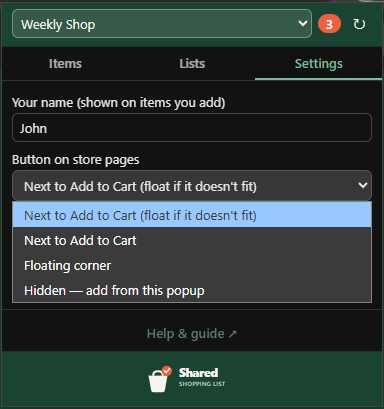
- Check Settings → Button on store pages. If it's set to Hidden, nothing is injected by design — add items from the popup instead. If it's set to Floating corner, look in that corner of the window rather than in the page.
- Make sure you're on an actual product page at a supported store (not search results or the homepage).
- Refresh the page — the button is added as the page loads.
- Confirm the extension is enabled and pinned from the Extensions menu.
I joined but no lists show up
- Double-check you pasted the whole invite link, including the
/join/…part at the end. - Ask whoever shared the list to re-copy the invite with Copy invite link for current list and send it again.
I declined a store-site permission
If product pages don't show the button after an update, the extension may need permission for the store site again. Re-visit the product page and approve any prompt, or remove and reinstall the extension.
Still stuck?
Note what you were doing, which browser you're on, and whether you created the list or joined one, and pass that to whoever shared the list with you.